Overview
Yunetas implements the OAuth2 Authorization Code + PKCE flow with a Backend-For-Frontend (BFF) pattern to authenticate browser-based SPAs. The key security property: raw JWT tokens are never visible to JavaScript. All tokens live exclusively in httpOnly cookies managed by the server.
The system is identity-provider agnostic. The reference deployment uses
Keycloak as the Authorization Server (OpenID Connect provider), but the
BFF code names everything as IdP (idp_calls, idp_timeouts,
idp_timeout_ms). Any OIDC-compliant provider works.
Components Involved
| Layer | Component | File | Role |
|---|---|---|---|
| Frontend (JS) | C_LOGIN GClass | yunos/js/gui_treedb/src/c_login.js | Initiates PKCE flow, handles redirect callback, schedules token refresh |
| Config | Per-hostname settings | yunos/js/gui_treedb/src/conf/backend_config.js | BFF URLs, Keycloak realm/client configuration |
| BFF Server (C) | C_AUTH_BFF GClass | kernel/c/root-linux/src/c_auth_bff.c | HTTP server on port 1801. Exchanges codes for tokens, manages cookies |
| WebSocket Bridge | C_WEBSOCKET | kernel/c/root-linux/src/c_websocket.c | Captures Cookie header from HTTP Upgrade request |
| Gatekeeper | C_IEVENT_SRV | kernel/c/root-linux/src/c_ievent_srv.c | Extracts access_token from cookie, injects into IDENTITY_CARD |
| Auth Manager | C_AUTHZ | kernel/c/root-linux/src/c_authz.c | Validates JWT signature (JWKS), checks expiry/issuer/claims, manages roles |
| JWT Library | libjwt | kernel/c/libjwt/src/ | Cryptographic JWT verification (RS256, ES256, EdDSA and more.) |
The Three Key Concepts
1. OAuth2 Authorization Code Flow
Instead of the application ever seeing the user’s password, the browser redirects to Keycloak’s login page. After the user authenticates, Keycloak redirects back with a short-lived authorization code. This code is then exchanged server-side for tokens.
2. PKCE (Proof Key for Code Exchange) — RFC 7636
PKCE prevents authorization code interception attacks. Before redirecting to Keycloak, the browser:
Generates a random
code_verifier(32 bytes, base64url-encoded)Computes
code_challenge = base64url(SHA-256(code_verifier))Sends the
code_challengeto Keycloak with the authorization requestLater, the BFF sends the original
code_verifierwhen exchanging the codeKeycloak verifies that
SHA-256(code_verifier) == code_challenge
An attacker who intercepts the authorization code cannot use it because they do not have the code_verifier.
3. BFF (Backend-For-Frontend)
The BFF is a thin server-side component (C_AUTH_BFF on port 1801) that acts as a secure intermediary between the browser and Keycloak. The browser never talks to Keycloak’s token endpoint directly. The BFF:
Exchanges authorization codes for tokens (server-to-server)
Stores tokens in
httpOnlycookies (invisible to JavaScript)Handles token refresh and logout
Complete Authentication Flow
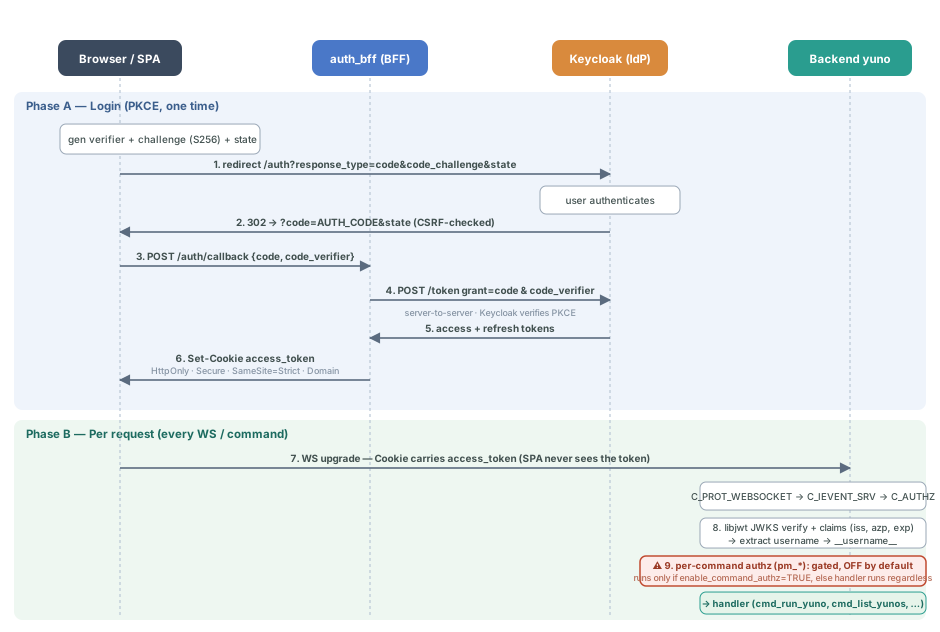
Overview of the two phases. The detailed step-by-step is below.
 ┌─────────────────────────────────────────────────────────────────────────┐
 │  STEP 1: User clicks "Login"                                          │
 │                                                                        │
 │  Browser (c_login.js)                                                  │
 │  ├── generate code_verifier  (32 random bytes → base64url)             │
 │  ├── compute  code_challenge (SHA-256 → base64url, method=S256)        │
 │  ├── generate state nonce    (16 random bytes, CSRF protection)        │
 │  ├── store {code_verifier, state} in sessionStorage                    │
 │  └── redirect to:                                                      │
 │      https://auth.artgins.com/realms/{realm}/protocol/openid-connect/  │
 │        auth?response_type=code                                         │
 │            &client_id={resource}                                       │
 │            &redirect_uri={app_origin}                                  │
 │            &scope=openid profile email                                 │
 │            &code_challenge={challenge}                                 │
 │            &code_challenge_method=S256                                 │
 │            &state={state}                                              │
 └─────────────────────────────────────────────────────────────────────────┘
                                    │
                                    ▼
 ┌─────────────────────────────────────────────────────────────────────────┐
 │  STEP 2: User authenticates at Keycloak                                │
 │                                                                        │
 │  Keycloak shows login page (username/password, or social login).       │
 │  On success, Keycloak stores the code_challenge and redirects back:    │
 │                                                                        │
 │  302 → https://app.example.com/?code=AUTH_CODE&state=STATE_NONCE       │
 └─────────────────────────────────────────────────────────────────────────┘
                                    │
                                    ▼
 ┌─────────────────────────────────────────────────────────────────────────┐
 │  STEP 3: Browser handles the callback (c_login.js)                     │
 │                                                                        │
 │  ├── verify state nonce matches sessionStorage (CSRF check)            │
 │  ├── clean URL with history.replaceState() (remove ?code= from bar)   │
 │  ├── retrieve code_verifier from sessionStorage                        │
 │  ├── delete PKCE state from sessionStorage (one-time use)              │
 │  └── POST to BFF (port 1801):                                          │
 │                                                                        │
 │      POST https://app.example.com:1801/auth/callback                   │
 │      Content-Type: application/json                                    │
 │      credentials: "include"                                            │
 │      {                                                                  │
 │        "code": "AUTH_CODE",                                             │
 │        "code_verifier": "ORIGINAL_VERIFIER",                            │
 │        "redirect_uri": "https://app.example.com/"                       │
 │      }                                                                  │
 └─────────────────────────────────────────────────────────────────────────┘
                                    │
                                    ▼
 ┌─────────────────────────────────────────────────────────────────────────┐
 │  STEP 4: BFF exchanges code with Keycloak (c_auth_bff.c)              │
 │                                                                        │
 │  C_AUTH_BFF makes a server-to-server HTTPS call to Keycloak:           │
 │                                                                        │
 │    POST https://auth.artgins.com/realms/{realm}/protocol/              │
 │         openid-connect/token                                           │
 │    Content-Type: application/x-www-form-urlencoded                     │
 │                                                                        │
 │    grant_type=authorization_code                                       │
 │    &code=AUTH_CODE                                                      │
 │    &code_verifier=ORIGINAL_VERIFIER   ← Keycloak verifies PKCE        │
 │    &redirect_uri=https://app.example.com/                               │
 │    &client_id=gui_treedb                                                │
 │    &client_secret=...  (if confidential client)                        │
 │                                                                        │
 │  Keycloak validates:                                                    │
 │    SHA-256(code_verifier) == stored code_challenge  ✓                  │
 │                                                                        │
 │  Keycloak responds with:                                                │
 │    { access_token, refresh_token, id_token, expires_in,                │
 │      refresh_expires_in, token_type: "Bearer" }                        │
 └─────────────────────────────────────────────────────────────────────────┘
                                    │
                                    ▼
 ┌─────────────────────────────────────────────────────────────────────────┐
 │  STEP 5: BFF sets httpOnly cookies and responds (c_auth_bff.c)        │
 │                                                                        │
 │  The BFF:                                                               │
 │  ├── Decodes the JWT payload to extract username and email              │
 │  ├── Sets cookies on the HTTP response:                                 │
 │  │                                                                      │
 │  │   Set-Cookie: access_token=<JWT>;                                    │
 │  │     HttpOnly; Secure; SameSite=Strict; Path=/; Domain=example.com   │
 │  │   Set-Cookie: refresh_token=<JWT>;                                   │
 │  │     HttpOnly; Secure; SameSite=Strict; Path=/; Domain=example.com   │
 │  │                                                                      │
 │  └── Returns to the browser (NO tokens in body):                        │
 │      {                                                                  │
 │        "success": true,                                                 │
 │        "username": "john",                                              │
 │        "email": "john@example.com",                                     │
 │        "expires_in": 300,                                               │
 │        "refresh_expires_in": 1800                                       │
 │      }                                                                  │
 │                                                                        │
 │  Cookie Domain is configured so cookies are shared between:             │
 │    port 1800 (WebSocket) and port 1801 (BFF)                           │
 └─────────────────────────────────────────────────────────────────────────┘
                                    │
                                    ▼
 ┌─────────────────────────────────────────────────────────────────────────┐
 │  STEP 6: Browser opens WebSocket (authenticated)                       │
 │                                                                        │
 │  The browser opens a WebSocket to port 1800.                           │
 │  The HTTP Upgrade request automatically carries the httpOnly cookies    │
 │  (the browser attaches them — JavaScript cannot read or set them).     │
 │                                                                        │
 │  GET wss://app.example.com:1800/  HTTP/1.1                             │
 │  Upgrade: websocket                                                     │
 │  Cookie: access_token=<JWT>; refresh_token=<JWT>                       │
 └─────────────────────────────────────────────────────────────────────────┘
                                    │
                                    ▼
 ┌─────────────────────────────────────────────────────────────────────────┐
 │  STEP 7: Server-side JWT validation chain                              │
 │                                                                        │
 │  C_WEBSOCKET (c_websocket.c)                                           │
 │  └── Captures Cookie header from HTTP Upgrade request                  │
 │      └── Passes it via EV_ON_OPEN { http_cookie: "..." }              │
 │                                                                        │
 │  C_IEVENT_SRV (c_ievent_srv.c) — the "gatekeeper"                     │
 │  └── Parses "access_token=<JWT>" from cookie string                   │
 │      └── Injects JWT into IDENTITY_CARD                                │
 │          └── Sends EV_IDENTITY_CARD to C_AUTHZ                        │
 │                                                                        │
 │  C_AUTHZ (c_authz.c) — authentication & authorization manager         │
 │  └── verify_token():                                                    │
 │      ├── Verify JWT signature using JWKS public keys (libjwt)          │
 │      ├── Check token expiry (exp claim)                                │
 │      ├── Validate issuer (iss claim)                                   │
 │      ├── Check email_verified claim                                     │
 │      ├── Look up user in treedb                                         │
 │      └── Assign roles and permissions                                  │
 │                                                                        │
 │  ✓ Connection authenticated → service GClasses can process events      │
 └─────────────────────────────────────────────────────────────────────────┘
Token Refresh Cycle
The access token has a short lifetime (typically 5 minutes). The frontend schedules a proactive refresh before it expires:
c_login.js: save_session_info()
├── Calculates refresh timeout:
│     timeout = min(0.75 * expires_in, expires_in - 30) seconds
│
├── When timer fires → do_bff_refresh():
│     POST https://app.example.com:1801/auth/refresh
│     credentials: "include"  (sends httpOnly cookies)
│
├── C_AUTH_BFF receives the request:
│     ├── Reads refresh_token from httpOnly cookie
│     ├── Calls Keycloak token endpoint:
│     │     grant_type=refresh_token
│     │     &refresh_token=<from_cookie>
│     │     &client_id=gui_treedb
│     ├── Receives new access_token + refresh_token
│     └── Sets new httpOnly cookies (overwriting old ones)
│
└── Browser receives { success, expires_in, refresh_expires_in }
    └── Schedules next refresh timer
This creates a continuous refresh loop that keeps the session alive without any token ever being visible to JavaScript.
Logout Flow
c_login.js: do_bff_logout()
├── POST https://app.example.com:1801/auth/logout
│   credentials: "include"
│
├── C_AUTH_BFF:
│   ├── Reads refresh_token from httpOnly cookie
│   ├── Calls Keycloak logout endpoint to revoke the refresh token:
│   │     POST .../protocol/openid-connect/logout
│   │     refresh_token=<from_cookie>
│   │     &client_id=gui_treedb
│   ├── Clears cookies with Max-Age=0:
│   │     Set-Cookie: access_token=; Max-Age=0; HttpOnly; Secure; ...
│   │     Set-Cookie: refresh_token=; Max-Age=0; HttpOnly; Secure; ...
│   └── Returns { "success": true }
│
└── Browser: closes WebSocket, shows login screen
Security Properties
| Property | How it is achieved |
|---|---|
| JWTs never in JavaScript | Tokens stored as httpOnly cookies — document.cookie cannot read them |
| No password in the SPA | OAuth2 Authorization Code flow — login happens at Keycloak’s page |
| Code interception protection | PKCE S256 — intercepted authorization codes are useless without code_verifier |
| CSRF protection | state nonce verified on callback. SameSite=Strict cookies |
| Token theft protection | Secure flag (HTTPS only). SameSite=Strict (no cross-site requests) |
| Server-side JWT validation | C_AUTHZ verifies signature via JWKS, checks expiry, issuer, claims |
| URL cleanup | history.replaceState() removes ?code= from URL bar after callback |
| Token refresh | Proactive refresh via BFF before access token expires |
Cookie Attributes Explained
Each cookie set by the BFF carries these attributes:
Set-Cookie: access_token=<JWT>;
  HttpOnly;           ← JavaScript cannot access (no document.cookie)
  Secure;             ← Only sent over HTTPS
  SameSite=Strict;    ← Never sent on cross-site requests (CSRF protection)
  Path=/;             ← Sent with all requests to this domain
  Domain=example.com  ← Shared between port 1800 (WS) and port 1801 (BFF)
The Domain attribute is critical: it allows the cookie set by the BFF on port 1801 to be automatically sent by the browser on the WebSocket Upgrade request to port 1800.
Configuration
BFF Server (C_AUTH_BFF attributes)
{
  "issuer":               "https://auth.artgins.com/realms/estadodelaire.com/",
  "client_id":            "gui_treedb",
  "client_secret":        "",
  "cookie_domain":        "yunetas.com",
  "allowed_origin":       "https://treedb.yunetas.com",
  "allowed_redirect_uri": "https://treedb.yunetas.com/",
  "crypto":               {"ssl_use_system_ca": true, "ssl_verify_mode": "required"},
  "pending_queue_size":   16,
  "idp_timeout_ms":       30000
}| Attr | Default | Purpose |
|---|---|---|
issuer | — (required) | OIDC issuer URL (for example https://auth.example.com/realms/foo/). Triggers discovery via /.well-known/openid-configuration. Use token_endpoint + end_session_endpoint instead to bypass discovery. |
client_id, client_secret | — | OAuth2 client credentials (leave client_secret empty for public PKCE clients). |
cookie_domain | "" | Domain= attribute on the cookies. Cross-checked against the request Host header — never trust a mismatched Host. |
allowed_origin, allowed_redirect_uri | "" | CORS origin and the prefix a callback’s redirect_uri must start with. |
crypto | {"ssl_use_system_ca": true, "ssl_verify_mode": "required"} | TLS crypto for the outbound IdP HTTP client. Verifying-by-default since 7.6.0: a public IdP is validated against the system CA store by default. For a private/self-signed IdP CA, override with {"ssl_trusted_certificate": "/path/ca.pem"}. The attribute replaces the default wholesale (no merge) — an override must repeat the verifying keys it still wants. mbedTLS has no system store: set ssl_trusted_certificate there. (The c_idp_keycloak kc_crypto attribute mirrors this for its Keycloak admin calls.) |
pending_queue_size | 16 (clamped to [1, 1024]) | Depth of the per-channel pending IdP request queue. Raised on front-line BFFs under burst. |
idp_timeout_ms | 30000 (0 disables) | Outbound IdP watchdog. If a round-trip exceeds this, the BFF replies 504 Gateway Timeout to the browser and drains the task. |
BFF internals (operator knobs)
A few details that are not visible in the request/response flow but matter in production:
Per-channel pending queue. Every browser channel has its own
dl_listof pending IdP requests (depthpending_queue_size). One job is in flight at a time. The rest wait FIFO. Overflows bump theq_full_dropsstat and the browser sees a mappederror_code.Flush-on-disconnect. When a browser closes mid-round-trip the BFF flushes its queue for that channel and, if a reply from the IdP later arrives for a disconnected client, drops it (
responses_droppedcounter). No cross-user token leak can occur: each task carries a per-browser generation which the reply path re-checks.Outbound IdP watchdog. A
C_TIMER0child armsidp_timeout_msthe moment the outbound HTTP client is created and disarms onac_end_task. On fire: the BFF sends504 Gateway Timeoutto the browser, drains the task and bumpsidp_timeouts. Closes the “silent IdP → channel wedged forever” deadlock.Stable error_code for GUI i18n. Every error response carries a stable
error_code(snake_case, for exampleinvalid_refresh_token,idp_unreachable,queue_full). The humanerrormessage is localisable in the GUI.error_codeis the i18n translation key and never changes between releases.Log hygiene. 4xx IdP replies are logged as
INFO, notERROR— a wrong password is not a server error. All secrets (cookies, authorization headers, client_secret) are redacted byredact_for_trace()with case-insensitive key matching.Stats.
mt_statsexposes:requests_total,q_count,q_max_seen,q_full_drops,idp_calls,idp_ok,idp_errors,idp_timeouts,responses_dropped,bff_errors. Any 2xx IdP reply counts asidp_ok(Keycloak/logoutreturns spec-compliant 204, which previously poisoned the health signal). The filter accepts"<stat>"or"<prefix>_"and is case-insensitive.Trace levels.
messagesandtraffictrace levels dump the full BFF↔IdP and BFF↔browser exchanges, with 👤 BFF prefix and ⏩/⏪ direction arrows. Both honour the redaction rules above.
Frontend (backend_config.js)
keycloak_configs = {
  "treedb.yunetas.com": {
    realm: "estadodelaire.com",
    "auth-server-url": "https://auth.artgins.com",
    resource: "gui_treedb",
    "public-client": true
  }
}
Keycloak Client Settings
| Setting | Value |
|---|---|
| Standard Flow | Enabled |
| Direct Access Grants (ROPC) | Disabled |
| Client Authentication | On (confidential) or Off (public) |
| PKCE Method | S256 (enforced) |
| Valid Redirect URIs | https://treedb.yunetas.com/* |
| Web Origins | https://treedb.yunetas.com |
Why BFF Instead of Direct Token Exchange?
Without a BFF, the browser will call Keycloak’s token endpoint directly and receive the JWT in a JavaScript-accessible response. This exposes tokens to:
XSS attacks (malicious scripts can steal them)
Browser extensions
localStorage/sessionStoragepersistence (survives page reload, accessible to any JS)
With the BFF pattern, the token exchange happens server-to-server. The browser only receives metadata (username, expires_in). The actual JWT travels only in httpOnly cookies that JavaScript cannot read, and the browser automatically attaches them to subsequent requests.
Social Login Support
Keycloak Identity Providers (Google, GitHub and more.) are supported via the kc_idp_hint parameter. When set, Keycloak skips its own login page and redirects directly to the social provider. The rest of the PKCE/BFF flow is identical — the BFF does not know or care which identity provider authenticated the user.
// c_login.js — social login adds kc_idp_hint to the authorization URL
if (kc_idp_hint) {
    url += "&kc_idp_hint=" + encodeURIComponent(kc_idp_hint);
}