This document covers the three intertwined operational concerns nobody can afford to misunderstand on a Yuneta host: who is calling (authn), what they can do (authz), and the TLS that protects the wire.
Sibling to YUNO_LIFECYCLE.md, DEBUGGING.md,
IPC.md, REALMS.md, SCAFFOLDING.md.
⚠️ Read §4.5 and §8.3 before assuming anything about authz enforcement. The per-command authz check is re-armed but gated in the framework (
kernel/c/gobj-c/src/command_parser.c). It runs only when the yuno sets theenable_command_authzattr TRUE. By default it is OFF, so a stock deployment is still authenticated-but-not-authorized at the command boundary. This is the difference from the old “commented out” state: theSDF_AUTHZ_Xflag is now consulted — turning the gate on enforces everypm_*/authz declaration without a code change. The subscription authz (EVF_AUTHZ_SUBSCRIBE) is re-armed the same way since 7.25.5, behind its own gateenable_subscription_authz, also OFF by default (§4.6).EVF_AUTHZ_INJECTis still unenforced (§8.4).
1. Mental model¶
Three independent pieces, often confused:
  ┌─────────────────────────────────────────────────────────────────┐
  │  authentication = "who is calling"                              │
  │     (the auth_bff yuno + Keycloak + JWT in an HttpOnly cookie)  │
  └────────────────────────────────────────────────┬────────────────┘
                                                   │
                                                   ▼
  ┌─────────────────────────────────────────────────────────────────┐
  │  authorization = "is the caller allowed to do X"                │
  │     (C_AUTHZ gclass + authzs treedb + pm_* schemas)             │
  │     ⚠️  Per-command check is GATED OFF by default               │
  │         (enable_command_authz; see §4.5, §8.3)                  │
  └────────────────────────────────────────────────┬────────────────┘
                                                   │
                                                   ▼
  ┌─────────────────────────────────────────────────────────────────┐
  │  TLS = "the bytes on the wire are confidential"                 │
  │     (ytls + cert_sync_* on the agent + reload-certs broadcast)  │
  └─────────────────────────────────────────────────────────────────┘
End-to-end request flow on a real production yuno:
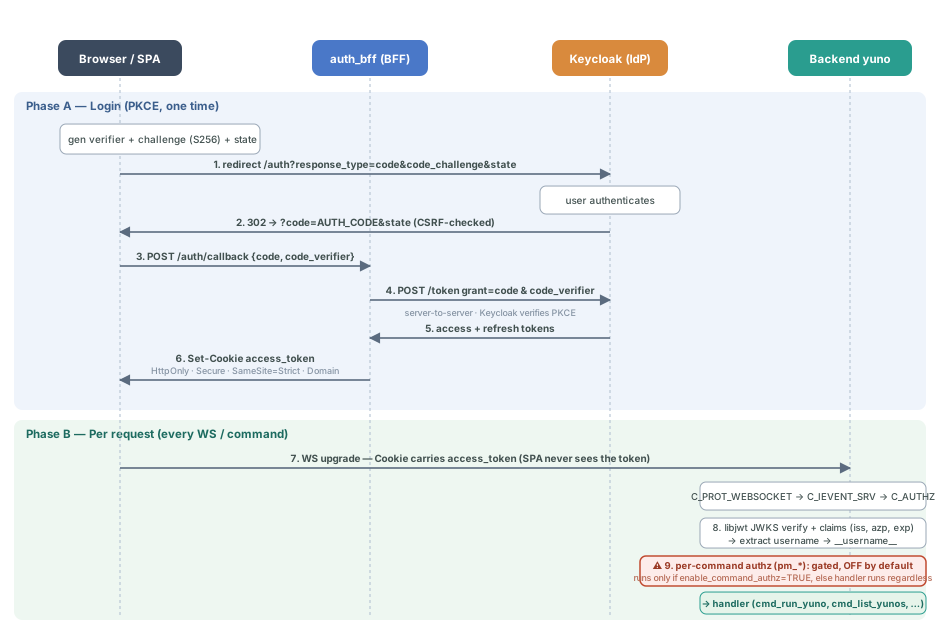
The same flow in text:
   browser SPA
        │
        │  1. POST /auth/login  →  auth_bff  →  Keycloak  → tokens
        │  2. Set-Cookie: access_token (HttpOnly, Secure, SameSite=Strict,
        │     Domain=hostname.tld)
        │
        ▼
   WS upgrade to backend yuno (any port on same Domain)
        │ Cookie header carries access_token
        │
        ▼
   C_PROT_WEBSOCKET  →  C_IEVENT_SRV
        │
        │  3. C_IEVENT_SRV pulls the cookie, hands it to C_AUTHZ
        │
        ▼
   C_AUTHZ
        │
        │  4. libjwt verifies signature (JWKS)
        │     + checks claims (issuer, azp/client_id, exp)
        │  5. extracts username → writes __username__ to the source gobj
        │
        ▼
   command dispatch (gobj_command)
        │
        │  6. ⚠️ The pm_* / SDF_AUTHZ_X check fires here ONLY if the yuno has
        │     enable_command_authz = TRUE (off by default). When off, the
        │     handler runs whether or not the user has the authz.
        │
        ▼
   the handler (cmd_run_yuno, cmd_list_yunos, …)
2. The auth_bff yuno — authentication¶
A standalone Yuneta yuno that runs the C_AUTH_BFF kernel gclass. It is
the only thing on the system that talks OAuth2 to the IdP. The SPA
never sees a token. It only carries the cookie.
2.1 Why a BFF (and not the SPA talking to Keycloak)¶
Tokens live in HttpOnly cookies, scoped by domain (no port). JavaScript cannot read them, and XSS attacks cannot extract them. The SPA only knows “am I authenticated” by the response code of API calls. This is the SEC-04/-06/-07/-09 hardening Yuneta deployments require.
2.2 The endpoints¶
Implemented in kernel/c/root-linux/src/c_auth_bff.c. URL dispatcher at
c_auth_bff.c.
| Endpoint | Method | Purpose | Sets cookies? |
|---|---|---|---|
/auth/login | POST | Username/password (Resource Owner Password Credentials grant) | yes |
/auth/callback | POST | PKCE code exchange (authorization_code grant) | yes |
/auth/refresh | POST | Reads refresh_token cookie, gets new access_token. Answers with the identity too (username, email) — the tokens are httpOnly, so it is the only way a reloaded SPA learns who it is | yes |
/auth/logout | POST | Calls IdP end_session_endpoint, clears cookies | yes (Max-Age=0) |
/auth/token | POST | Opt-in. Returns the access_token to JS (multi-backend forwarding) | no |
OPTIONS * | OPTIONS | CORS preflight | no |
/auth/token — multi-backend identity-card forwarding (opt-in)¶
By default the SPA never sees a raw token (SEC-06): tokens live only in
HttpOnly cookies scoped to the BFF host, so they cannot be forwarded to a
backend on a different host. When a single SPA must open WebSockets to
Yuneta backends on other hosts, for example the gui_treedb browser served
at artgins.ytreedb.com that connects to wss://app.wattyzer.com:1602, or
the Monitor workspace of gui_agent that talks to a node’s agent directly
(wss://agent.yunovatios.es:1993), it forwards the access_token itself in the
C_IEVENT_CLI identity_card jwt field. The remote C_IEVENT_SRV accepts an identity-card JWT with priority
over the (absent) cookie, and C_AUTHZ validates it against the issuer JWKS
exactly as a cookie token — so each remote backend must have the issuer’s
JWKS in its config (Authz.jwks) and a role for the target service.
POST /auth/token (reads the access_token cookie, sent same-origin by the
browser, and returns it in the body: {success, access_token}) is the only
way the SPA obtains that token. It is a deliberate, opt-in SEC-06
relaxation and is disabled by default. Two guards keep it safe:
expose_access_tokenattr (defaultfalse) — when off, the endpoint is invisible (404 unknown_endpoint), so every other BFF keeps tokens unreadable by JS. Enable it only on the BFF whose SPA needs forwarding.Origin pinning (fail-closed) — even when enabled, the token is emitted only when the request
Originmatchesallowed_originexactly. If that origin is unset or does not match, the BFF answers403 origin_not_allowedand never the token. To expose the token you therefore must pin the single SPA origin that can read it.
Residual risk: an XSS on the pinned origin itself can read the token, because it is then same-origin. Reduce the risk with a short access_token TTL and a strict CSP on that SPA. Keep the flag off on every BFF that does not need it.
2.3 PKCE authorization-code flow¶
c_auth_bff.c. The flow:
SPA generates
code_verifier, derivescode_challenge, redirects to IdP/authwith the challenge.IdP redirects back with
code.SPA POSTs
{code, code_verifier, redirect_uri}to/auth/callback.BFF validates
redirect_uriagainstallowed_redirect_uri(c_auth_bff.c, SEC-06).BFF calls IdP
/tokenwithgrant_type=authorization_code+code_verifier(c_auth_bff.c).The tokens arrive. BFF writes them as HttpOnly cookies (
c_auth_bff.c).
State and nonce are the SPA’s responsibility — the BFF does not generate them.
2.4 The cookies¶
Built in make_set_cookie() at c_auth_bff.c:860:
Set-Cookie: access_token=<jwt>; Max-Age=<expires_in>;
Path=/; HttpOnly; Secure; SameSite=Strict; Domain=<host>HttpOnly(c_auth_bff.c) — JS cannot read.Secure— HTTPS only.SameSite=Strict— no cross-site CSRF.Path=/— sent with all requests to the origin.Domain(c_auth_bff.c) — set fromcookie_domainattr, no port. Means a cookie set by the BFF on port 1801 is automatically sent with the WebSocket upgrade to ports 1600 / 1800 / etc on the same hostname.Max-Age—expires_infor access,refresh_expires_infor refresh.
Logout clears both with Max-Age=0 (c_auth_bff.c).
2.5 The OIDC config: issuer + (optional) explicit endpoints¶
attrs_table at c_auth_bff.c:
| Attribute | Status | Purpose |
|---|---|---|
issuer | preferred | OIDC issuer URL, for example https://auth.example.com/realms/foo/. Triggers discovery via /.well-known/openid-configuration. |
token_endpoint | explicit override | Bypass discovery. force the token URL. |
end_session_endpoint | explicit override | Same, for logout. |
client_id | required | OAuth2 client id. Also the value the JWT’s azp claim must match. |
client_secret | optional | Empty for public clients with PKCE. |
redirect_uri | per-request | From the callback request body. |
allowed_redirect_uri | required | Allow-list prefix for /auth/callback redirect_uri. |
cookie_domain | required | Domain attribute for cookies (no port). |
idp_timeout_ms | default 30000 | Bounds the IdP round-trip once connected (C_TASK’s exec_timeout). On expiry the browser gets 504. |
idp_connect_timeout_ms | default 30000 | Bounds the wait to connect to the IdP. See §2.6. |
Discovery requires BOTH endpoints in the issuer’s document: without
end_session_endpoint it fails. Auth0 does not publish one (it has its own
/v2/logout) and some Cognito setups omit it, so for them set both explicit
endpoints, which skips discovery. Keycloak and Authentik publish both.
"kw": {
    "token_endpoint": "https://example.auth0.com/oauth/token",
    "end_session_endpoint": "https://example.auth0.com/v2/logout",
    "client_id": "my-spa"
}
The 2026-04-30 migration unified everything under issuer + (optional)
explicit endpoints. The legacy Keycloak idp_url + realm pair was
deprecated then and removed after 7.5.4 — configure issuer (or the
explicit token_endpoint + end_session_endpoint) only.
2.6 When the IdP is unreachable (a node immediately after a reboot)¶
The yuno starts before the network is usable, so the first OIDC discovery fails. Since 7.9.1 that failure is bounded and recoverable. Before 7.9.1 the login hung forever and wrote nothing to the log.
Two different things are timed, and conflating them is a bug:
idp_timeout_ms— the round-trip once connected. This isC_TASK’sexec_timeout, and it only covers the action: it is armed insideexecute_action, which runs only once the channel is connected (c_task.c,mt_start).idp_connect_timeout_ms— the wait to connect. Nothing else covers it: while the IdP is unreachable the task sits waiting for a connection that never arrives, unarmed and unbounded, so it never publishesEV_END_TASK,discovery_donestays FALSE, and every browser request queues behind it.
C_AUTH_BFF arms its own C_TIMER for the connect gap and disarms it in
ac_on_open the moment the outbound connects, so the two never time the same
thing twice. On expiry it fails the task through C_TASK’s own path
(EV_TIMEOUT → stop_task(-2)), which yields:
| Situation | Answer to the browser |
|---|---|
| discovery never completed | 502 auth_service_unavailable |
| IdP connected but silent | 504 auth_timeout |
A failed discovery is not terminal: process_next re-arms it on the next
request, so recovery rides on a retry — there is nothing to poll for, the
endpoints are only needed at login. What an operator sees in the log is
“BFF IdP unreachable, task watchdog fired” (with connected and
tcp_state), then “OIDC discovery failed, draining queue”.
The SPA side matters as much. A 502 auth_service_unavailable on
/auth/refresh is a failure of the TRANSPORT and says nothing about the
user’s credentials, so a client must retry with backoff and keep the
session, never log the user out. Reading data.success while ignoring the
HTTP status is the mistake that turns a node reboot into a forced re-login for
everyone.
2.7 Per-host runtime configuration¶
yunos/c/auth_bff/batches/<host>/auth_bff.<port>.json. The shape is
illustrated by the localhost dev example (batches/localhost/auth_bff.1801.json:55-58):
"issuer":        "https://auth.artgins.com/realms/yunetas.com/",
"client_id":     "treedb.yunetas.com",
"client_secret": "",
"cookie_domain": ""
In production deployments the project’s Keycloak gives those four realm. See §7 for the project conventions.
2.8 Diagnose a failure of the IdP¶
The browser never sees the cause: the BFF maps every IdP failure to a stable
code of its own catalog (c_auth_bff.h). The log carries the cause.
When the mapping is one of the three generic ones —
auth_unexpected_error, auth_config_error, auth_service_unavailable —
send_token_to_browser writes the answer of the IdP:
"msg": "👤BFF IdP rejected the request", "action": "login", "idp_status": 401,
"idp_error": "invalid_client",
"idp_description": "Invalid client or Invalid client credentials",
"client_id": "app.example.com", "browser_code": "auth_config_error"
Read idp_error and client_id first. The example above is a client that no
longer exists in the realm, which is the failure that a deleted or renamed
client gives.
The four specific mappings (invalid_credentials, session_expired,
account_disabled, auth_rate_limited) name the cause by themselves, so they
travel on the single line of send_error_response and add nothing more. A
wrong password is not a diagnosis problem.
2.9 Pending bugs¶
Two issues are tracked but not fixed (per
project_auth_bff_pending_bugs):
HTTP_CL chain leak (
c_auth_bff.c). Under rapid browser-disconnect during a/tokencall, the outboundC_PROT_HTTP_CLchain to Keycloak is not always released cleanly.No real-IdP smoke tests. The auth_bff test suite at
tests/c/c_auth_bff/runs againstc_mock_keycloak.conly. Live Keycloak regressions are caught manually.
3. JWT validation on incoming requests¶
3.1 The Cookie crossing the WS upgrade¶
The browser’s WebSocket upgrade request includes the cookies set by the
BFF (same Domain). C_PROT_HTTP_SR parses the headers, and the resulting
gobj tree carries the Cookie header through the upgrade into
C_IEVENT_SRV (or C_AUTHZ acting as the external gate).
3.2 Reading the JWT¶
c_ievent_srv.c declares two volatile attributes the channel
exposes after auth:
http_cookie— the raw cookie header (set byc_authzduring upgrade).jwt_payload— the decoded JWT payload, also set byc_authz.
The comment at c_ievent_srv.c is explicit: “HACK set by c_authz,
this gclass is an external entry gate!”. The actual cookie→JWT path
runs inside C_AUTHZ, not C_IEVENT_SRV.
3.3 Signature verification: libjwt¶
kernel/c/libjwt/ — Yuneta vendors a copy of libjwt. The verification
entry point is jwt_parse() in jwt-verify.c:136. The [JWKS] endpoint gives the keys(https://ytls
abstraction used by TCP.
3.4 Claim validation: the azp → client_id migration¶
The JWT’s azp (authorized party) claim must match the configured
client_id. Per c_task_authenticate.c:
"OAuth2 client_id (Keycloak/Auth0/Azure AD/...).
 Sent verbatim as the client_id form parameter on /token and /logout.
 Also matches the JWT 'azp' claim"
Before the 2026-04-30 migration the check string was hard-coded as
"azp". After the migration the BFF reads the configured client_id
and validates against it. New deployments must use the configured
attribute, not the literal azp name.
Other validated claims: iss (must match issuer), exp (expiry),
nbf if present.
CLI grant type — ROPC, Keycloak-only (PKCE deferred by design). The CLI
tools authenticate via c_task_authenticate, which POSTs
grant_type=password (ROPC: username + password + client_id). This works
against Keycloak (every deployed IdP) but Auth0 / Cognito / Azure AD /
Authentik disable ROPC by default. Replacing it is not a drop-in to PKCE:
all six callers (ycli, ycommand, ystats, ytests, ybatch, mqtt_tui)
are headless or TTY with no browser, so the interactive authorization-code +
loopback flow does not apply. The real path — device-flow (RFC 8628) for
interactive use plus client-credentials for headless CI — is deferred until
a non-Keycloak IdP is adopted. Until then, do not point a CLI at a
ROPC-disabled IdP. Full analysis in TODO.md.
3.5 The __username__ attribute¶
After successful authn, c_authz.c writes the resolved
username into the source gobj’s __username__ attribute:
gobj_write_str_attr(src, "__username__", username);Every later authz check pulls __username__ from there. Code calling
into the framework on behalf of a user can populate this attribute
manually for test fixtures. In production a JWT always gives this value.
4. Authorization: C_AUTHZ¶
The C_AUTHZ gclass (kernel/c/root-linux/src/c_authz.c, 4114 lines)
is the singleton authorization service. One instance per yuno (created
as the default authz service in the yuno_citizen template, see
SCAFFOLDING.md §5.1). Other gobjs find it with
gobj_find_service_by_gclass(C_AUTHZ, TRUE) (c_authz.c).
4.1 The authzs treedb schema¶
kernel/c/root-linux/src/treedb_schema_authzs.c. Three topics:
| Topic | pkey | Notable columns |
|---|---|---|
users | id | disabled, max_sessions, credentials, properties, __sessions__, roles[] (fkey to roles) |
roles | id | parent_role_id (fkey for inheritance), service, permission, permissions[], deny, parameters, users{} (dict hook back to users) |
users_accesses | id+tm | login audit: ev, ip, jwt_payload |
Roles can inherit from a parent (parent_role_id) — get_user_roles()
at c_authz.c walks the chain and accumulates effective
authzs.
4.2 The yuneta super-user¶
if(strcmp(username, "yuneta") != 0) {
    gobj_log_warning(…, "Without JWT/passw only yuneta is allowed", …);
    return json_pack(…, "comment", "Without JWT/passw only yuneta is allowed", …);
}
yuneta is the only user permitted to authenticate without a JWT
or password. This is the authentication-side bypass — there is no
matching authz bypass. The agent’s __username__ attribute defaulting
to "yuneta" (c_agent.c) gives the agent itself this bypass for
its local CLI calls.
If a check is enforced (see §4.5), yuneta does not automatically
pass. The authz check is a separate lookup. In production deployments
yuneta usually owns every role.
The seed cannot be deleted. Authz.initial_load holds the seed root
role and the yuneta user (c_agent.c main.c). C_AUTHZ hands the
attr down to its treedb’s C_NODE at mt_create, and C_NODE applies it on
every master start: it creates any missing seed record, writes a declared
link that is missing, and marks the record immutable with
treedb_set_node_immutable(). CRUD operations can therefore never remove the
powers of the local trusted user. delete-node refuses an immutable record,
and force does not override it. The link yuneta → roles^root^users
is protected too: C_NODE refuses to unlink a link a seed declares, to
update the seed dropping it, or to delete the role it hangs from
(YUNO_TREEDB.md §3.10). Deployed stores become protected on
their next restart, with no schema change and no wipe, because the mark is
md2 metadata and not a column (see YUNO_TREEDB.md §3.10).
Only the two seed records are frozen. The roles and users topics
stay ordinary: they are editable, and other roles and users delete normally.
agent22 shares the store as non-master and does not run the loop.
The loop used to live in C_AUTHZ mt_start, written for one treedb. It is
C_NODE’s now, so any treedb gets it by declaring initial_load — the
authz seed is one caller of a general facility, and Authz.initial_load keeps
its name and its shape.
4.3 gobj_user_has_authz¶
The predicate. gobj.h, body at gobj.c:
PUBLIC BOOL gobj_user_has_authz(hgobj gobj, const char *authz, json_t *kw, hgobj src);Resolution order:
The gclass’s own
mt_authz_checkermethod, if declared (gobj.c).The globally-installed
__global_authorization_checker_fn__(gobj.c). This is set byC_AUTHZat registration.If neither is installed, returns
TRUE(default-allow).
That last point matters: a yuno with no C_AUTHZ service running has no
authz enforcement at all. Every call passes.
4.4 The pm_* and SDATAAUTHZ schemas¶
gobj.h. Two macros define the schema:
SDATAPM(type, name, flag, default, description)— a parameter row.SDATAAUTHZ(...)— declares an authz that a command requires (with optional alias and items schema).
A command’s parameter schema is declared once as a sdata_desc_t array
and referenced in the SDATACM2 row in the command table. Example from
c_agent.c:
PRIVATE sdata_desc_t pm_run_yuno[] = {
    SDATAPM(DTP_STRING, "id",        0, 0, "Id of yuno"),
    SDATAPM(DTP_STRING, "realm_id",  0, 0, "Realm Id"),
    SDATAPM(DTP_STRING, "yuno_role", 0, 0, "Yuno Role"),
    …
};
The framework treats pm_run_yuno as a parameter schema for input
validation (which is enforced). The authz-flag handling on commands
is gated behind a yuno attr (next section).
4.5 The command authz check — re-armed, gated opt-in¶
The SDF_AUTHZ_X check at the command-dispatch boundary in
command_parser.c
was commented out for years. It is now re-armed but gated behind a
yuno attr, so the default stays non-breaking:
if(cnf_cmd->flag & SDF_AUTHZ_X) {
    hgobj yuno = gobj_yuno();
    BOOL authz_enabled = yuno &&
        gobj_has_attr(yuno, "enable_command_authz") &&
        gobj_read_bool_attr(yuno, "enable_command_authz");

    if(authz_enabled && src != gobj) {              // self-issued cmds bypass
        json_t *kw_authz = json_pack("{s:s}", "command", command);
        json_object_set(kw_authz, "kw", kw);        // checker owns kw_authz
        if(!gobj_user_has_authz(gobj, "__execute_command__", kw_authz, src)) {
            // logged (MSGSET_AUTH), then:
            return build_command_response(gobj, -403,
                json_sprintf("No permission to execute command: '%s'", command), 0, 0);
        }
    }
}
The three pieces that make it safe:
The gate —
enable_command_authz. A newSDF_RDboolean attr onc_yuno(enable_command_authz, default"0",c_yuno.c). The check runs only when this is TRUE.SDF_RD(notSDF_WR) on purpose: the runtimewrite-attrcommand cannot turn authz off at runtime — only config or code can set it. Absent attr → off.External-only — the kw
__username__marker. The check fires only for external commands: those whose kw carries__username__, the authenticated principal thatc_ievent_srvinjects (kw_set_dict_value, overwrite — a wire client cannot spoof it) on every dispatched wire command. Internalgobj_command()calls carry no kw__username__and are never gated. Without that rule a yuno denies its own startup commands, for example the agent’sopen-treedb, and then it exits. (The 2026-06-08 pilot found this. SeeTODO.md.)The self-bypass —
src == gobj. This is a second guard. A command that a gobj issues to itself is also bypassed, for example thec_yunocert-reload walkgobj_command(child, …, child).Deny is logged, not silent (
MSGSET_AUTH), and returns-403viabuild_command_response(gobj-c), not the old root-linuxmsg_iev_build_responsethe commented block referenced.
Effects with the gate OFF (default): the same as the old commented state.
Every authenticated caller runs every command. The framework reads the
SDF_AUTHZ_X flag, then allows the command immediately.
Effects with the gate ON: every SDF_AUTHZ_X command requires
__execute_command__, resolved through the global authz_checker against the
c_authz role model. This needs a running C_AUTHZ service — the default
checker is fail-closed and denies when it cannot find one. If you enable the
gate in a yuno without a C_AUTHZ role model, it denies all 133
SDF_AUTHZ_X commands. Enable it only where a role model exists, and test it
on staging first. It is a breaking change for deployments that assigned no
roles.
Implemented 2026-06-07 with a gated opt-in posture. Redesigned 2026-06-08 after the agent pilot: the check is now external-only, with the kw
__username__marker, and a global authz resolves on any gobj through theauthzs_listglobal fallback. The gate therefore no longer denies the internal startup commands of a yuno. The fail-open-without-C_AUTHZposture and the strict-always-enforce posture are still available. SeeTODO.md§ Security: re-enable per-command authorization. The regression test istests/c/command_authz/test_command_authz.c. It covers six cases: gate-off runs, external+deny → -403, internal-command bypass, self-bypass, external+granted runs, and global authz resolves.
4.6 EVF_AUTHZ_SUBSCRIBE — the subscription check, gated opt-in¶
gobj.h declares the flags and gobj.c the
matching global authzs (__inject_event__, __subscribe_event__). Since
7.25.5 the subscription check is re-armed, the same way as the command
check of §4.5: it was commented out in C_IEVENT_SRV (since v6) and in
gobj_subscribe_event(), so a subscription asked nothing. The practical
effect was that the EV_TREEDB_NODE_* feed of a treedb went to any
authenticated user, while C_NODE’s own commands asked read for the same
data.
The check runs in C_IEVENT_SRV (is_subscription_authorized()), for a
__subscribing__ message, after the “only PUBLIC events” check. It fires only
when all of these are true:
The gate —
enable_subscription_authz. AnSDF_RDboolean attr onc_yuno, default"0". Likeenable_command_authz, only config or code can set it, and the two gates are independent. Absent or off → every subscription is accepted, as up to 7.25.4.The event is flagged
EVF_AUTHZ_SUBSCRIBEin the publisher’sevent_types. An event without the flag is never checked.The subscription is external. Only
C_IEVENT_SRVasks, and every subscription that arrives there comes from a peer, with the authenticated__username__thatC_AUTHZwrote on the channel. An internalgobj_subscribe_event()never goes through it and is never checked.
The permission asked is the one of the publisher’s gclass whose alias is
__subscribe_event__, so a subscription asks what a read of the same data
asks. When the gclass names none, the global __subscribe_event__ is asked.
The check calls gobj_user_has_authz(publisher, permission, kw_authz, channel)
with kw_authz = {"event": …, "__username__": …, "kw": <subscription kw>}.
A refusal is logged as an error (MSGSET_AUTH, “No permission to subscribe
event”, with service, event, permission and username). The
subscription is not made and the channel stays open: the peer keeps its
session and its other subscriptions, and it gets no events of the refused one.
An unsubscribe is never checked, because it removes only the channel’s own
subscriptions. The peer still holds a refused subscription and withdraws it
(for example when a view closes): that is logged at info level (“UNSUBSCRIBING
event never subscribed, its subscription was refused”), not as an error.
Since 7.25.5 C_IEVENT_SRV counts the refusals of each channel, so that line
means what it says: a withdrawal that matches no subscription and was not
refused is a warning (“UNSUBSCRIBING event matches no subscription of this
channel”), with the gate on or off.
The check sees the subscription as the peer sent it, but the peer does not
choose how the framework delivers it: C_IEVENT_SRV keeps only
__first_shot__ of its __config__, and removes every subscription of the
channel with force when it closes. Up to 7.25.4 a peer that held the
permission could subscribe with __hard_subscription__: the subscription
outlived the session and went to the next user of the channel, past this
check (see ievent.md,
What a peer may put in a subscription).
How a gclass declares a guarded feed (a publisher with a read permission).
C_NODE declares its feed this way since 7.25.5: its five EV_TREEDB_NODE_*
are EVF_AUTHZ_SUBSCRIBE, and its read carries the alias, so with the gate
on the feed of a treedb asks what nodes and node ask:
PRIVATE const char *read_alias[] = {"__subscribe_event__", 0};

PRIVATE sdata_desc_t authz_table[] = {
/*-AUTHZ-- type---------name----flag----alias-------items-----------description--*/
SDATAAUTHZ (DTP_SCHEMA, "read", 0,      read_alias, pm_authz_read,  "Permission to read nodes, and to subscribe to their events"),
SDATA_END()
};

event_type_t event_types[] = {
    {EV_TREEDB_NODE_CREATED, EVF_PUBLIC_EVENT|EVF_OUTPUT_EVENT|EVF_NO_WARN_SUBS|EVF_AUTHZ_SUBSCRIBE},
    …
};
C_TRANGER declares its realtime feed the same way since 7.25.5:
EV_TRANGER_RECORD_ADDED is EVF_AUTHZ_SUBSCRIBE and its read carries the
alias. The feed is published to every subscriber, so a subscriber keeps to its
own rt_id only with its __filter__. Up to 7.25.4, with the gate on, a user
without read could not run open-rt, but could subscribe to the event with
no filter and get every record of the feeds that other users opened, the
topics of a treedb included.
Which public events carry the flag. Every public output event of the SDK
(EVF_PUBLIC_EVENT|EVF_OUTPUT_EVENT in kernel/, modules/ and yunos/),
and why it has the flag or not:
| GClass | Events | EVF_AUTHZ_SUBSCRIBE | Why |
|---|---|---|---|
C_NODE | EV_TREEDB_NODE_CREATED, _UPDATED, _DELETED, _LINKED, _UNLINKED | yes, read | The nodes of a treedb: the data that nodes and node guard with read. |
C_TRANGER | EV_TRANGER_RECORD_ADDED | yes, read (since 7.25.5) | The records of a topic: the data that open-rt and open-list guard with read. |
C_PTY | EV_TTY_OPEN, EV_TTY_DATA, EV_TTY_CLOSE | no | A console of the agent is a service named after the console, and a channel reaches it only when that name is in its authorized_services (a root role in practice). C_PTY has no permission of its own to ask. |
C_AGENT, C_AGENT22 | EV_PLAY_YUNO_ACK, EV_PAUSE_YUNO_ACK | no | The acknowledgement of a play or pause, the yuno’s identity and state, no data. The agent’s service is reached only by its operators. |
C_AGENT, C_AGENT22 | EV_MT_COMMAND_ANSWER, EV_MT_STATS_ANSWER | no | Declared public output, but never published: an answer is sent straight to the gobj that asked. |
C_PROT_HTTP_SR | EV_ON_OPEN, EV_ON_MESSAGE, EV_ON_CLOSE | no | A protocol child, never a service: a peer cannot name it. |
C_POSTGRES | EV_ON_OPEN, EV_ON_MESSAGE, EV_ON_CLOSE | no | Carries query results, but it is a child of C_DBA_POSTGRES, never a service. It has no permission table: a yuno that makes it a service must give it a read-like permission with the alias first, and then flag EV_ON_MESSAGE. |
The other EVF_PUBLIC_EVENT of the SDK are input events (EV_MT_COMMAND,
EV_SEND_EMAIL, …): they are injected, and a subscription to them is refused
before any authz (“not PUBLIC or PUBLIC event”). A publisher of a project
(the db_history yunos, for example) is guarded only when it flags its own
events and aliases a permission.
How a yuno turns the gate on (in its config, like enable_command_authz):
{
    "yuno": {
        "enable_subscription_authz": true
    }
}
With the gate on, a user needs read on the publisher’s service to subscribe,
the same role that already lets them run nodes and node. The gate needs a
running C_AUTHZ role model, like the command gate: the default checker is
fail-closed and refuses every flagged subscription without one.
EVF_AUTHZ_INJECT (__inject_event__) is still declared only (§8.4).
The regression test is
tests/c/c_subscription_authz.
Three C_IEVENT_CLI connect to a C_IEVENT_SRV over loopback and cover four
cases: gate off → subscribed, gate on without read → refused and logged,
an event without the flag → subscribed, and gate on with read → subscribed,
with the checker asked for read. It runs the cases against a test publisher,
against a real C_NODE (EV_TREEDB_NODE_UPDATED) and against a real
C_TRANGER (EV_TRANGER_RECORD_ADDED). The feed then reaches only the
accepted subscriptions.
4.7 Where authz is enforced today¶
Two paths, in priority order:
The framework command gate — when the yuno sets
enable_command_authzTRUE (§4.5), everySDF_AUTHZ_Xcommand from an externalsrcis checked. This is the canonical path. For new services with aC_AUTHZrole model, use it instead of per-handler checks.The subscription gate — when the yuno sets
enable_subscription_authzTRUE (§4.6), every external subscription to anEVF_AUTHZ_SUBSCRIBEevent asks the publisher’s permission aliased__subscribe_event__.Custom code inside specific gclasses that calls
gobj_user_has_authzdirectly. Examples worth knowing about:Inside
C_AUTHZ’s own commands (you cannot list users without authority over the auth service itself).Inside
auth_bfffor things like cookie-domain validation (c_auth_bff.cHost-vs-Domain matching, SEC-06).The MQTT broker’s per-group publish/subscribe ACL (a topic-pattern model in the broker’s own treedb, not
gobj_user_has_authz— see themqtt_brokerdoc’s Authorization section).
If a yuno has no C_AUTHZ role model and you still need a command gated
right now, add an explicit gobj_user_has_authz call at the top of that
handler rather than turning on the (fail-closed) global gate.
4.8 Per-instance config keys (authz.*)¶
The C_AUTHZ gclass reads a small set of attrs at boot (see
c_authz.c attrs_table):
| Key | Status | Purpose |
|---|---|---|
authz.master | bool, default false | Whether this instance owns the authz treedb (writer) or follows another (reader). The service never sets it: an empty tranger_path only builds the path, and the directory is created only by a master. Without it, a store that does not exist yet gives “No authz db, authz only to local access” and no treedb; a store another yuno owns is opened as a READ-ONLY replica. The agent says 'Authz.master': true in its main.c. |
authz.authz_service | preferred | Service name under which to build/look up the authz tree. Empty → defaults to yuno_role. |
authz.authz_yuno_role | SDF_DEPRECATED | Legacy alias for authz.authz_service. Fallback at c_authz.c — only read if authz_service is empty. New configs must use authz.authz_service. |
authz.tranger_path | optional | External tranger storage path (when sharing the authz treedb across instances). |
Same Authz.* keys (capital A) appear in some legacy configs — both
spellings are accepted by jansson’s path resolution, but the canonical
form is the lowercase authz.* used in yuno_agent/src/main.c.
There is also a JWKS migration analogous to §2.5:
| Key | Status | Purpose |
|---|---|---|
Authz.jwks | preferred | Array of full JWK objects (the standard format). |
Authz.jwt_public_keys | legacy | Older iss + pkey (raw PEM) tuple. Superseded by Authz.jwks. Drop from new configs. |
Gotcha: if you use the deprecated authz.authz_yuno_role, the
controlcenter will silently reject the agent’s identity card (“User not
exist”) — the JWT validates fine but the user→service mapping returns
empty. Both spellings reach c_authz.c but the deprecated one
generally lags behind in coverage. Always prefer authz.authz_service.
4.9 Output events: a subscriber can refuse a login¶
C_AUTHZ publishes three events. They are how a service learns about the
users reaching it, and they are the only hook it gets on the login path:
| Event | Published from | Payload |
|---|---|---|
EV_AUTHZ_USER_NEW | mt_authenticate(), unknown user | username, dst_service |
EV_AUTHZ_USER_LOGIN | mt_authenticate(), authenticated | username, dst_service, user, session, services_roles, jwt_payload |
EV_AUTHZ_USER_LOGOUT | the session’s EV_ON_CLOSE | username, user, session |
EV_AUTHZ_USER_LOGIN is not a notification — it is a veto point.
mt_authenticate() checks what gobj_publish_event() returns, and answers
result: -1 (“Some subscriber refusing user”) when the return is negative. A
subscriber that cannot accept the user therefore denies the login. The
framework NAKs the identity card and drops the peer. Before this change the
publish discarded its return value. A service that cannot register the user
had no way to say so, and the user entered anyway. See the CHANGELOG for the
release that changed it.
Consequences worth knowing before you write an action for this event:
Returning a negative value from your action denies the login. Every in-tree subscriber (
c_agent,c_mqtt_broker) returns 0. An out-of-tree gclass that returns negative for unrelated reasons will start locking users out.The checked value is the sum of the subscriber returns, not “any negative”. With several subscribers, a
-1and a+1cancel out.A subscriber holding
__own_event__short-circuits the accumulation (gobj.cbreaks beforeret += ret_), so its refusal is never seen.Refusing is safe for the peer.
c_ievent_clidrops the transport on the NAK, andc_tcpreconnects with its backoff, so a refused agent returns. That is what makes “refuse until I can register the user” a valid answer and not an outage.
There is no in-tree refuser since 7.25.14. The one there was,
c_controlcenter’s ac_user_login(), refused every login that arrived
before its treedb_controlcenter opened in mt_play() (the authz service
is autoplay: true and authenticates from boot), because it could not yet
copy the user into a users topic of its own. Nothing ever read that topic --
the users are the authz store’s -- so the topic, the subscription and the
refusal are gone, and so are the “Treedb Controlcenter not ready” warnings
a control-center restart used to log while its agents reconnected.
4.10 Role/permission hardening backlog (final phase)¶
Status: deferred by decision (2026-07-24). The fleet runs today with authorization almost entirely off. Authentication decides who enters, and almost nothing decides what they can do. To enable it is a single final phase: define a role→permission matrix, create users with those roles, then enable the gates. Until then this is a living inventory. Record here every place that needs a role or permission check, as you find it, so that the final phase has a complete punch list. Do not enable the gates one by one, because a half-applied matrix locks out working operators. Land the whole matrix at one time.
Points found so far (verified this session unless noted):
enable_command_authzis OFF on every node (attr absent). With it off, the per-commandSDF_AUTHZ_Xgate incommand_parser.cnever fires (see §4.5), so any principal the node authenticates can run the entire agent surface —install-binary,update-binary,kill-yuno,deactivate-snap,create/delete-realm,command-yuno, configs, … Fix in the final phase: setenable_command_authz+ give eachSDATAAUTHZcommand a permission and map roles to it.What the node authz list governs today, with the gate off, is not only
open-console. A command that callsgobj_user_has_authz()ITSELF is checked regardless of the gate, andC_NODE— every treedb — does exactly that, in EVERY command that reads or writes the treedb (since 2026-09-15: before, onlynodesaskedread, andnode,link-nodes,import-dband the snaps asked nothing). The table is inYUNO_TREEDB.md§3.6. So the treedb surface of every yuno is already fail-closed per user, while the agent’s own control plane is wide open — the inverse of what an operator expects. Verified 2026-08-12 byclaudia@artgins.com(point 3): every topic oftreedb_system_schemaanswered-403 No permission to 'read'until they were given a role in THAT yuno’sC_AUTHZ. The matrix must cover the per-yuno treedb permissions, not only the agent commands, and until it does an operator needs a role in each yuno whose schema or data they are to touch.The controlcenter’s
command-agentis not scoped per node/tenant.cmd_command_agent(c_controlcenter.c) checks only the flatcommand-agentpermission on the CC. A holder can then address every agent registered on that CC. The artgins CC is a multi-tenant hub: start-fleet, normedan hospital nodes, a CESGA cluster of about 15 nodes, raspz and more. One CC-root operator therefore reaches every node of every tenant. This needs a role and permission model that scopes which agents and tenants a CC role cancommand-agent, and which cmd2agent verbs it can forward.Seed admins are god-mode and immutable.
yuneta,yuneta_admin@artgins.com(and the CC’sowner) carryrealm_id:* service:* permission:*. The matrix needs granular roles below root, for example read-only observer, deploy-only, console-only (kitchen) and lifecycle-only, so that day-to-day operators are not root.claudia@artgins.comis the concrete test case. They are CC-root but not in the node authz, so today, with the gate off, they have full node management withoutopen-console. The matrix must decide what they get per node.ac_mt_commandon the client side trusts the peer’s asserted identity (emptyCheck AUTHZbanner inc_ievent_cli.c— seeIPC.md§4.7). A node therefore fully trusts whatever__username__the controlcenter it dialled asserts. That is load-bearing: the CC’s authentication must be airtight, because every node delegates authorization of the operator to it. Under a seal the CC is the only door, so this trust is the fleet’s whole perimeter.command-agent/command-yunoforward unchecked keys (“WARNING: parameter’s keys are not checked”). Once the gate is on, the forwardedcmd2agent/inner command is authz-checked at the destination — but confirm nestedcommand-agent … cmd2agent="command-agent …"chains re-evaluate authz at each hop, not only at the first.seal-node/unseal-node/node-seal-status(proposed, seeNODE_SEALING.md§3) must be authz-gated to a dedicated role — sealing/unsealing is the highest-privilege operation on the box.C_IEVENT_SRVcross-service gate already checksdst_serviceagainst theservices_rolesSET, but a test gap was noted (see the project memory /c_ievent_srv). The final phase must close it and add the service-level roles to the same matrix.open-consoleis currently the whole per-node boundary and it is a single flat permission: a root shell, or nothing. The matrix can split console access from full node management, since agent22’s entire surface is the console — a “console-only / break-glass” role is the natural unit.A yuno with NO
C_AUTHZservice is fail-closed for everyone — the inverse failure of point 1, and it hides in plain sight.authz_checker()opens withgobj_find_service_by_gclass(C_AUTHZ)and denies when it finds nothing, so a yuno that never declared the service refuses everygobj_user_has_authz()command to every principal,rootincluded. Found 2026-08-25 on three yunovatios yunos (db_tracks_co,db_tracks_ce,gate_caudal), all of them internal (loopback / serial listeners only), so SSH was the only remaining way in. Fixed there by declaring the service as a FOLLOWER of the node’s authzs store. For the matrix this means the inventory is per YUNO, not per node: a role is worth nothing in a yuno that has nobody to read it. Detail and the sealing consequence inNODE_SEALING.md§5.5.How an SPA user acts on an INTERNAL yuno is undecided, and the default answer bypasses the matrix entirely. Today the working pattern (
gate_enchufein estadodelaire / hidraulia,gate_energiain yunovatios) ispublic_services: ['__top_side__']: the SPA opens a session straight to the yuno and calls e.g.set-power, which carries nogobj_user_has_authz()guard — so the authenticated session IS the permission, and the gate of point 1 never sees it. The alternative iscommand-yunothrough the agent, which does reach the yuno’sC_AUTHZwith the real operator identity (measured 2026-08-25). The matrix has to say which door application actions use, or it will keep being decided one app at a time. SeeNODE_SEALING.md§5.5.The treedb feed follows the subscription gate, not
readalone.C_NODEasksreadin its commands with or without a gate (point 1), but theEV_TREEDB_NODE_*feed asks it only when the yuno setsenable_subscription_authz(§4.6). With that gate on, every GUI that subscribes to a treedb needsreadon that treedb’s service for its user: the gobj-ui treedb views (C_YUI_TREEDB_TOPICS,C_YUI_TREEDB_TOPIC_WITH_FORM,C_YUI_TREEDB_GRAPH), gui_treedb, the treedb views of gui_agent, and the app GUIs built on them (wattyzer, yunovatios). The realtime feed of aC_TRANGER(EV_TRANGER_RECORD_ADDED) follows the same gate since 7.25.5, and a GUI that streams a topic withopen-rtneedsreadon the tranger’s service. A gclass of a project that re-publishes the feed under its own service (thedb_historyyunos) is its own publisher: it is guarded only if it flags its events and aliases a permission (see the table in §4.6).
When the final phase runs: author the matrix (roles × permissions ×
realm/service scope), provision users, set enable_command_authz and
enable_subscription_authz on the agents
and scope command-agent on the controlcenters, then re-verify the
§2.1 access doors with a non-root role to
confirm that the boundary works.
5. C_AUTHZ commands (user / role CRUD)¶
The command_table at c_authz.c declares them. These are the names:
| Command | Purpose |
|---|---|
help | List commands |
authzs | Authz help |
list-jwk | JWKS keys cached by libjwt |
add-jwk | Add a JWK to the running set (until the yuno restarts: the persistent set is the config’s Authz.jwks) |
remove-jwk | Remove a JWK from the running set (until the yuno restarts) |
users | List users |
accesses | List users_accesses audit rows |
create-user | Create a user row |
enable-user | Flip disabled=false (writes that column only) |
disable-user | Flip disabled=true (writes that column only) and drop the user’s sessions |
delete-user | Remove a user row (force=1 to delete one that holds roles. Immutable users are never deleted) |
check-user-pwd | Verify a password against credentials |
set-user-pwd | Set a user’s password |
roles | List roles |
user-roles | List a user’s roles |
user-authzs | Effective authzs of a user (after role inheritance) |
set-max-sessions | Bound concurrent sessions for a user (writes max_sessions only); with no username, the service default max_sessions_per_user |
All are declared with SDF_AUTHZ_X, requiring __execute_command__ — enforced
only when the broker yuno sets enable_command_authz (§4.5). It is off by
default. Besides that gate, C_AUTHZ asks a permission of its own, always
(since the cloud review of 2026-10-02): a command from a peer (its kw carries
the __username__ of the entry gate) needs the permission of the users
treedb’s C_NODE, treedb_authzs, as link-nodes does -- read to list
(users, accesses, roles, user-roles, user-authzs, list-jwk),
create for create-user (and update too when it links a role), update
for the rest of the writes (update-user, enable-user, disable-user,
set-user-pwd, set-max-sessions, add-jwk, remove-jwk, and
check-user-pwd, a password oracle), delete for delete-user. Without it:
-403, “no permission to ‘update’ in service ‘treedb_authzs’”. Internal
calls (no __username__) are not asked. A yuno with no users treedb
(local access only: no JWT is validated there) answers list-jwk with the
keys of its config (jwks, empty unless the config sets it), which it never
uses to validate anything, and refuses add-jwk / remove-jwk to everybody
-- up to 7.25.22 any valid JWT could add a key there, and the key, never
used, leaked. A role
granting it:
{"id": "user_admin", "realm_id": "*", "service": "treedb_authzs", "permission": "*"}(realm_id is required in a role, "*" for any realm: without it the role is
refused by the schema.)
The event doors. C_AUTHZ also writes users from three input events that
no command guard sees: EV_ADD_USER (create or update, what create-user
sends itself), EV_REJECT_USER (drop the user’s sessions, and write
disabled when the kw carries it) and EV_IDP_USER_CREATED (an IdP
provisioner created an account). A project’s gclass sends them directly:
gobj_send_event(priv->gobj_authz, EV_REJECT_USER,
    json_pack("{s:s, s:b}", "username", username, "disabled", 1), gobj);
On a READ-ONLY replica of the users store EV_ADD_USER and
EV_IDP_USER_CREATED return -1 and write nothing. EV_REJECT_USER fails
closed: it drops the live sessions of the user whatever happens to the write
of disabled -- refused on a replica, or a failed append -- and returns -1
when that write did not happen (after 7.25.3; the refused write left the user
connected, because the sessions were read from the write’s NULL answer).
Agent-side: cmd_authzs_yuno (c_agent.c:6544, registered as
authzs-yuno at c_agent.c) is the agent’s wrapper to broadcast
authz data to all running yunos.
6. TLS¶
ytls (kernel/c/ytls/) is the runtime-selectable OpenSSL / mbedTLS
abstraction. Every TCP gclass gets a ytls pointer and a use_ssl
boolean. See IPC.md §6.6 for how TLS is hooked into the
gate stack.
The interesting operational machinery in production is certificate auto-sync: keeping cert files fresh as letsencrypt rotates them.
6.1 cert_sync — overview¶
Driven by the agent. Periodically runs a “copy certs” command, diffs the result, and broadcasts a reload event to every yuno if anything changed. Yunos that hold TLS listeners reload from disk without dropping live connections.
        agent's cert_sync_timer (default 900 s)
                │  every interval:
                ▼
        snapshot /yuneta/store/certs                ← before
                │
        run cert_sync_copy_cmd (sudo)                ← e.g. copy from
                │                                     /etc/letsencrypt
                ▼
        snapshot /yuneta/store/certs                ← after
                │
        diff before vs after
                │
        ┌───────┴────────┐
        │                │
   no change         changed
        │                │
        │                └─► publish reload-certs to every running yuno
        │                    │
        │                    ▼
        │                yuno's C_TCP_S re-reads its cert from disk
        │                without closing existing connections
        ▼
   last_check ← now
6.2 The agent’s cert_sync_* attributes¶
| Attribute | Default | Purpose |
|---|---|---|
cert_sync_enabled | 1 | Master enable |
cert_sync_interval_sec | 900 (15 min) | How often to check |
cert_sync_store_dir | /yuneta/store/certs | Directory the yunos read certs from |
cert_sync_copy_cmd | /usr/bin/sudo -n /yuneta/store/certs/copy-certs.sh | Command run on every tick |
cert_sync_last_check | 0 | Unix ts, updated on tick |
cert_sync_last_action | 0 | Unix ts, updated when a change applies |
cert_sync_last_result | "" | ok / skipped / error |
cert_sync_failures | 0 | Cumulative failure counter |
cert_sync_store_dir and cert_sync_copy_cmd are set in the agent’s
configuration only (SDF_RD): the command is run with system(), and up to
7.25.21 write-attr could set it and persist it. cert-sync-now and
cert-sync-status need the authz of a command (SDF_AUTHZ_X).
{
    "global": {
        "agent.cert_sync_copy_cmd": "/usr/bin/sudo -n /yuneta/store/certs/copy-certs.sh"
    }
}
6.3 The copy-certs.sh convention¶
The default cert_sync_copy_cmd shells out via sudo -n to a script you
control:
/usr/bin/sudo -n /yuneta/store/certs/copy-certs.shTypical content (deployer-supplied, not shipped by yunetas):
#!/bin/bash
# /yuneta/store/certs/copy-certs.sh
set -e
cp /etc/letsencrypt/live/example.com/fullchain.pem /yuneta/store/certs/example.com.crt
cp /etc/letsencrypt/live/example.com/privkey.pem   /yuneta/store/certs/private/example.com.key
chown yuneta:yuneta /yuneta/store/certs/*.crt /yuneta/store/certs/private/*
The sudo -n needs NOPASSWD in sudoers. That is a wide grant. See §8.10.
6.4 The reload broadcast¶
c_agent.c: when the post-snapshot diff says “changed”,
cert_sync_broadcast_reload() sends command=reload-certs service=__yuno__
to every running yuno via cmd_command_yuno(), plus the local agent.
Yunos without TLS listeners ignore the event. Yunos with TLS handle it
at c_tcp_s.c — re-read the cert paths configured in their
crypto attribute, swap the new cert into the listening context, leave
existing connections alone.
6.5 cert-sync-now and cert-sync-status¶
cmd_cert_sync_now (c_agent.c:7357) forces a tick immediately.
cmd_cert_sync_status (c_agent.c:7380) returns the full state:
enabled, interval_sec, store_dir, copy_cmd, last_check,
last_action, last_result, failures, plus a
deploy_hook_last_run timestamp read from
/var/lib/yuneta/last-deploy-hook-run if present.
6.6 How a yuno reads its cert paths¶
Direct from disk via its config. Example from
batches/localhost/auth_bff.1801.json:26-27:
"crypto": {
    "ssl_certificate":     "/yuneta/store/certs/localhost.crt",
    "ssl_certificate_key": "/yuneta/store/certs/private/localhost.key"
}
The yuno does not know about cert-sync. It only reads these paths again
when reload-certs arrives. Cert-sync is the producer, and the crypto block
of the yuno is the consumer. They communicate only through the filesystem and
the reload event.
7. Per-project Keycloak realms¶
The convention from
auth_bff/README.md:
one auth_bff instance per Keycloak realm, one realm per project.
7.1 Project-realm mapping (known production state)¶
| Project | Keycloak host | Realm name | Notes |
|---|---|---|---|
| yunetas dev | auth.artgins.com | yunetas.com | Localhost dev batch, see batches/localhost/auth_bff.1801.json. |
| wattyzer | (per project, private repo) | (per project) | See wattyzer batches/. |
| estadodelaire | (per project, private repo) | (per project) | See estadodelaire batches/. |
7.2 Bootstrap checklist for a new project¶
Create the realm in Keycloak (
<project>or<project>connect).Register the OAuth2 client in that realm:
Public client (no client_secret) if browser-only.
Confidential client (with secret) if server-to-server.
Set
Valid Redirect URIsto the BFF’s callback.Set
Web Originsto the SPA’s origin.
Write
yunos/c/auth_bff/batches/<host>/auth_bff.<port>.json:{ "issuer": "https://auth.<project>.example/realms/<realm>/", "client_id": "<client_id>", "client_secret": "", "cookie_domain": "<project>.example", "allowed_redirect_uri": "https://<project>.example/auth/callback" }Provision a TLS cert for
<project>.example+auth.<project>.exampleunder/yuneta/store/certs/(or however the project’scert_sync_copy_cmddelivers it).install-binary+create-config+create-yunofor the auth_bff (seeYUNO_LIFECYCLE.md§6.1,SCAFFOLDING.md§10.1).If the project registers its users from the GUI, provision the IdP admin client too (§7.3). This client is a second one, and the checklist above does not create it.
7.3 The IdP admin client (register-idp-user)¶
C_IDP_KEYCLOAK
(kernel/c/root-linux/src/c_idp_keycloak.c)
creates a user in Keycloak with one command: register-idp-user. The local
authzs user is written by C_AUTHZ, which subscribes to the event
EV_IDP_USER_CREATED that the command publishes.
NOTE: Before SDK 7.9.7 this command was a command of C_AUTHZ, and callers sent
it to the service authz. It is now a command of C_IDP_KEYCLOAK, and callers
send it to the service idp. C_AUTHZ answers what a user may do; it does not
provision accounts. Declare the new service in the yuno config:
{
    'name': 'idp',
    'gclass': 'C_IDP_KEYCLOAK',
    'priority': 0,
    'default_service': false,
    'autostart': true,
    'autoplay': false,
    'kw': {}
}
The commands are neutral (register-idp-user, and not register-kc-user), and
so is the service name. A second identity provider comes as a second gclass
that serves the same commands. You select it in the configuration.
CAUTION: The kc_* attrs are persistent, and a yuno keeps them in the file
<GCLASS>-<service>-persistent-attrs.json of the realm. The gclass and the
service name are both part of that name, so the values that set-kc-config
wrote for C_AUTHZ-authz are not found by C_IDP_KEYCLOAK-idp, and the first
register-idp-user answers kc_unavailable.
Move the six keys to the new file with the yuno stopped. Move them, and do
not copy them: C_AUTHZ no longer declares the kc_* attrs, so a key left
behind logs “GClass Attribute NOT FOUND” at every start of the yuno. The
alternative is to run set-kc-config again, which needs the client secret
again and writes it on a command line.
D=/yuneta/realms/<realm>/<role>^<id>/data
python3 - "$D" <<'EOF'
import json, os, sys
d = sys.argv[1]
src = os.path.join(d, "C_AUTHZ-authz-persistent-attrs.json")
dst = os.path.join(d, "C_IDP_KEYCLOAK-idp-persistent-attrs.json")
old = json.load(open(src))
json.dump({k: v for k, v in old.items() if k.startswith("kc_")},
          open(dst, "w"), indent=4)
json.dump({k: v for k, v in old.items() if not k.startswith("kc_")},
          open(src, "w"), indent=4)
EOF
Then view-kc-config on the idp service reads the values back, with the
secret masked.
The command needs a second Keycloak client. The client of the SPA is not enough:
| Client | Type | Used by | Grant |
|---|---|---|---|
| SPA client | public, with PKCE | auth_bff + browser | authorization_code |
| admin client | confidential | C_IDP_KEYCLOAK | client_credentials |
The admin client needs a service account. That service account needs the
manage-users role of the realm-management client of the same realm. Without
this role, Keycloak refuses the call that creates the user.
CAUTION: Give this client only to a consumer that you trust with the realm. The
manage-users role is realm-wide. The service account can create, change and
delete every user of the realm, and not the users of one application only. In
Keycloak a user belongs to the realm, and not to a client.
An account that register-idp-user creates can therefore authenticate against
every client of the realm. The authorization does not travel with it. Each
C_AUTHZ refuses a JWT when its username has no node in the local users
topic, and it answers “User does not exist”. register-idp-user writes that
local node only in the yuno that runs the command.
Give one client to each consumer, and name it user-provisioner-<consumer>.
The name starts with the function, because the scope is the realm. The suffix
names the holder of the secret. Then one node that leaks its secret costs one
disabled client, and the admin events of Keycloak name the service account that
created each account.
C_IDP_KEYCLOAK makes three calls to Keycloak, always in this order:
POST /realms/<realm>/protocol/openid-connect/token, withgrant_type=client_credentials. The token stays in memory until it expires.POST /admin/realms/<realm>/users, with the required actionsUPDATE_PASSWORDandVERIFY_EMAIL. The new account has no password. After status 201, the gclass publishesEV_IDP_USER_CREATED, andC_AUTHZwrites the local authz user with the role that the caller gave. A subscriber that returns a negative value makes the answer carry the warningauthz_write_failed.PUT /admin/realms/<realm>/users/<id>/execute-actions-email, withclient_id=<kc_email_client_id>andredirect_uri=<kc_redirect_uri>. Keycloak sends the invitation email, and the user sets the password there.
The realm must have an SMTP server. If the realm has no SMTP server, call 3
fails. Then the answer carries the warning email_send_failed: the account
exists, but nobody receives the invitation.
The redirect URI must be a valid redirect URI of kc_email_client_id. Keycloak
refuses call 3 when that URI is not registered in that client.
One connection to Keycloak is shared, and the requests are serialized. A request waits in a queue of 32 places.
The configuration. Six persistent attrs hold it. set-kc-config writes the
attrs that you pass, and view-kc-config reads them back with the secret
masked. The defaults are empty on purpose: no identity is in the code, and none
is in a committed config.
| attr | Example | Note |
|---|---|---|
kc_base_url | https://auth.example.com | Keycloak 17 and later have no /auth prefix |
kc_realm | example | The realm where the accounts are created |
kc_admin_client_id | user-provisioner-example | The confidential client |
kc_admin_client_secret | (the secret) | Persistent, and masked in view-kc-config |
kc_email_client_id | app.example.com | The SPA client that the invitation email links to |
kc_redirect_uri | https://app.example.com/ | Where the invitation sends the user after the password change |
kc_crypto holds the TLS configuration of these outbound calls. By default it
verifies the certificate against the system CA. For a private CA, or for
mbedTLS, give it ssl_trusted_certificate. kc_timeout_ms (30000) is the
watchdog of one round trip.
The authz gates. Every command calls gobj_user_has_authz itself, so all
of them are enforced with enable_command_authz OFF (§4.5). There are three
permissions, and they belong to the service idp:
| permission | Gates |
|---|---|
configure-kc | set-kc-config, view-kc-config |
register-idp-user | register-idp-user |
manage-idp-users | list-idp-users, get-idp-user, update-idp-user, delete-idp-user, send-idp-user-actions |
Creating an account and deleting one are different permissions on purpose: an
operator who registers people does not have to be able to delete them. A role
with permission * on service * passes all three.
The error codes. The answer carries a stable error_code:
error_code | Cause |
|---|---|
no_permission | The caller does not hold the permission the command needs |
invalid_email | The email parameter is empty, or it has no @ |
invalid_user_id | The command needs user_id and it is empty |
nothing_to_update | update-idp-user was called with no field to change |
unknown_role | The role of register-idp-user is not in treedb_authzs |
kc_unavailable | No configuration, or Keycloak is unreachable, or Keycloak answered 5xx |
kc_token_refused | Keycloak refused the client credentials (401 or 403): wrong secret, or no manage-users role |
user_not_found | Keycloak answered 404: no account with that user_id |
user_already_exists | Keycloak answered 409 |
kc_validation_error | Keycloak refused the data (4xx). The comment carries the Keycloak errorMessage |
kc_timeout | The round trip was longer than kc_timeout_ms |
kc_busy | More than 32 requests are in the queue |
An unconfigured C_IDP_KEYCLOAK answers kc_unavailable with the comment
“Keycloak admin is not configured (run set-kc-config)”. The queue drains
without a call to the network.
When the account is created, the result is 0. Then a warning field can carry
email_send_failed or authz_write_failed. Both warnings tell you the same
thing: the Keycloak account exists, but the second half is incomplete.
The recipe is §9.7.
7.4 Manage the accounts¶
register-idp-user creates one account. These five read and change what is
already in the realm, so an operator does not have to open the Keycloak web
console. All of them need the manage-idp-users permission, all of them answer
asynchronously, and all of them go through the same queue and the same shared
connection as the registration.
| Command | Keycloak call | Answers |
|---|---|---|
list-idp-users | GET /admin/realms/<realm>/users | The page, as a list |
get-idp-user | GET /admin/realms/<realm>/users/<id> | One account |
update-idp-user | PUT /admin/realms/<realm>/users/<id> | {id} |
delete-idp-user | DELETE /admin/realms/<realm>/users/<id> | {id} |
send-idp-user-actions | PUT .../users/<id>/execute-actions-email | {id} |
user_id is the Keycloak uuid, and not the email. Read it from
list-idp-users, or from the id of the answer of register-idp-user. The
parameter is user_id and not id because command-yuno reserves id for
the yuno filter.
The value is validated before it is used, and not only read: it goes into the
path of the admin API, where a space breaks the request line and a / or a
.. walks to another endpoint of the realm. Only the unreserved characters of
RFC 3986 are accepted, which is all a uuid needs; anything else answers
invalid_user_id. The search of list-idp-users is percent-encoded for the
same reason.
list-idp-users pages, and the page is bounded. first and max are the
Keycloak paging (default 50, ceiling 500), and search matches the username,
the first and last name and the email. The ceiling is there because the realm
is shared with every other product of the same organization: one call must not
be able to pull all of it. brief=0 asks for the full representation.
update-idp-user changes only what you pass. firstName, lastName,
enabled, emailVerified and requiredActions; a field you do not pass stays
as it is. These parameters, brief of list-idp-users and actions of
send-idp-user-actions are declared DTP_JSON (since SDK 7.26.10; they were
DTP_STRING, and the command parser now refuses a boolean or a list given to
a string): the handler reads each one in more than one shape. A boolean is
true/false from a SPA, or 1/0, true, yes on the command line; a
list is a json list, the json of one, or one bare word. Send
requiredActions=[] to clear the pending actions of an account.
delete-idp-user deletes in the IdP only. The treedb_authzs record stays
where it is. The two planes are deleted one by one on purpose, so nobody loses
an authorization record to a cascade they did not ask for; use delete-user of
the authz service for the other half.
send-idp-user-actions is the invitation email again, with the actions you
choose. The default is UPDATE_PASSWORD; VERIFY_EMAIL is the other common
one. It needs the same kc_email_client_id and kc_redirect_uri as the
registration, and the realm needs SMTP.
ycommand -c 'command-yuno id=<yuno> service=idp command=list-idp-users search=alice max=10'
ycommand -c 'command-yuno id=<yuno> service=idp command=update-idp-user user_id=<uuid> enabled=0'
ycommand -c 'command-yuno id=<yuno> service=idp command=send-idp-user-actions user_id=<uuid> actions=VERIFY_EMAIL'
7.5 The default role of a provisioned user¶
C_AUTHZ has the attr default_role, set in the config. When it reacts to
EV_IDP_USER_CREATED and the event carries no role, it links this one. Empty
is the default, and then the user enters and can do nothing, which is visible
and safe.
No role can be hardcoded, because the roles come from the initial_load of
each realm and none is guaranteed to exist. For the same reason the attr is
checked before it is used: a default_role that is not in treedb_authzs
creates the user with no role and logs an error, instead of failing in silence
for ever.
Set it in the yuno’s config, where the trusted keys are too:
{
    "global": {
        "Authz.default_role": "viewer"
    }
}
Up to 7.25.21 it was writable and persisted, and the way to set it was
write-attr. But write-attr is guarded only by the per-command gate, off by
default (§4.5): anyone who could send commands to the yuno could set it to
root and so give root to every user an IdP provisions. The same held for
jwks, where write-attr could plant a trusted signing key. Both are the
config’s now; a value persisted by an older release is no longer read, and
the load says so once per start (“Persistent attrs file holds an attr that
is not persistent: NOT loaded”, with the attr’s name) -- up to 7.25.22 it
was dropped in silence, and a node whose keys came only from add-jwk lost
its JWT logins at the restart with nothing in its log.
8. Sharp edges¶
8.1 client_secret in cleartext in batches¶
The localhost batch shows client_secret: "" (empty), but production
batches in private repos commit the real secret in cleartext JSON. There
is no encrypted-secret-store integration today. If you commit a
production batch to git, the secret is in history forever — rotate it
in Keycloak first.
8.2 SMTP password in cleartext¶
stress/c/listen/deploy-yuno/emailsender.artgins.json:7 has an SMTP
password field in cleartext (the public repo example carries a
placeholder, but the private repos have the real value). See
project_emailsender_smtp_secret:
pending env-var migration + rotation as of 2026-05-15. The same secret
also lives in the agent’s treedb at runtime.
8.3 The command authz check is OFF by default¶
command_parser.c. The most important thing in this document.
The check is re-armed (§4.5) but gated behind enable_command_authz, default
OFF. By default the framework therefore does not call
gobj_user_has_authz for commands, and every authenticated user can run every
command. The effective posture is the same as the old commented-out state.
Plan for this:
On a stock yuno, do not use
pm_*orSDF_AUTHZ_Xfor security. The gate is off.To enable the gate you need a running
C_AUTHZrole model in that yuno. The global checker is fail-closed, so the gate without a role model denies allSDF_AUTHZ_Xcommands. Test it on staging first.For commands that must be gated on a yuno with no role model, call
gobj_user_has_authzexplicitly at the top of the handler instead.
8.4 Inject authz is unenforced; subscription authz is OFF by default¶
EVF_AUTHZ_INJECT (gobj.h) is declared and the
global authz __inject_event__ is registered (gobj.c), but
no check runs when a peer injects an event: it has no gate and no
enforcement — declared only.
EVF_AUTHZ_SUBSCRIBE is enforced since 7.25.5 (§4.6), but behind
enable_subscription_authz, which is off by default. On a stock yuno any
authenticated user can therefore subscribe to any public event, the
EV_TREEDB_NODE_* feed of a treedb included.
8.5 Authz default is allow¶
gobj_user_has_authz returns TRUE if no checker is installed
(gobj.c). A yuno that did not register C_AUTHZ has zero
authz enforcement, even for the custom gobj_user_has_authz calls
inside individual gclasses. The default is open.
8.6 The yuneta bypass is authentication-only¶
c_authz.c permits the yuneta user to authenticate without
JWT/password. It does not give yuneta automatic authz over
everything. The user must still own roles. In practice the agent’s
yuneta user owns every role in production, but a fresh deployment
can authenticate as yuneta and still hit “no permission” on a
custom-gated operation.
8.7 Legacy idp_url + realm still works¶
The deprecation warning is logged but the BFF accepts the legacy shape
and constructs the URL automatically (c_auth_bff.c). Do not depend
on this. Migrate the batches.
8.8 HTTP_CL chain leak on rapid disconnect¶
c_auth_bff.c. During load testing with aggressive
client disconnects in the middle of /token, the outbound HTTP client chain
is not always released. Watch the open-fd count of the process when the load
is unusual.
8.9 No real-IdP smoke tests¶
tests/c/c_auth_bff/ runs against c_mock_keycloak.c. Regressions
against a real Keycloak release go unnoticed in CI. Manual smoke test
on staging is mandatory before any auth_bff release.
8.10 cert_sync_copy_cmd requires NOPASSWD sudo¶
sudo -n /yuneta/store/certs/copy-certs.sh. Pick the smallest
possible NOPASSWD scope — ideally only that exact script path. A
careless yuneta ALL=(ALL) NOPASSWD: ALL line in sudoers turns the
yuno process into a full-root foothold. Cert-sync needs nothing more
than the one script.
8.11 Cert-sync is host-global¶
The cert_sync_* attrs are on the agent, not on the realm. One host
shares one cert directory and one copy command across every realm.
If two realms need disjoint certs you cannot achieve it through
cert-sync — partition by host or ship cert paths directly via per-yuno
config.
8.12 Cookie Domain is shared across all yunos on the host¶
The BFF sets Domain=<host> with no port. A cookie set by the BFF on
:1801 goes automatically to the WebSocket on :1800, on :1600 and on the other
ports of the same hostname. This is deliberate, because it lets the SPA move
between services. But it means that any yuno on the same hostname can read the
cookie. Do not run an untrusted yuno on the same hostname as the BFF.
8.13 reload-certs is broadcast unconditionally¶
Every running yuno receives the event. A yuno without TLS does nothing in the
handler. If the reload-certs handler of a yuno has a bug, the cert change
produces a noisy error in every log, but the cert still propagates. The
broadcast is best-effort, not transactional.
9. Recipes¶
9.1 Configure auth_bff for a new project (with Keycloak)¶
# 1. realm + client in Keycloak first
#    - realm name: <project>connect (convention)
#    - client: public + PKCE, valid redirect uri = https://<project>.example/auth/callback

# 2. write the batch config
cat > /yuneta/development/yunetas/yunos/c/auth_bff/batches/<host>/auth_bff.1801.json <<'EOF'
{
    "issuer":               "https://auth.<project>.example/realms/<project>connect/",
    "client_id":            "<project>-spa",
    "client_secret":        "",
    "cookie_domain":        "<project>.example",
    "allowed_redirect_uri": "https://<project>.example/auth/callback"
}
EOF

# 3. cert in /yuneta/store/certs/ (provisioned by your copy-certs.sh)

# 4. install + create + run via the agent (see YUNO_LIFECYCLE.md §6.1)
9.2 Migrate a legacy idp_url + realm batch to issuer¶
- "idp_url":  "https://auth.example.com",
- "realm":    "yunetas.com",
+ "issuer":   "https://auth.example.com/realms/yunetas.com/",
That is all. The deprecation warning stops on the next start.
Verify the issuer URL with curl against
<issuer>.well-known/openid-configuration.
9.3 Add a user via C_AUTHZ commands¶
# create (the role parameter has the format roles^<role_id>^users)
ycommand -c 'command-yuno id=<yuno> service=authz command=create-user username=alice@example.com role=roles^operator^users'

# password: for an MQTT device only. A human account authenticates by JWT.
ycommand -c 'command-yuno id=<yuno> service=authz command=set-user-pwd username=alice@example.com password=<...>'

# inspect
ycommand -c 'command-yuno id=<yuno> service=authz command=users'
ycommand -c 'command-yuno id=<yuno> service=authz command=user-roles username=alice@example.com'
ycommand -c 'command-yuno id=<yuno> service=authz command=user-authzs username=alice@example.com'

# disable, or delete (force=1 also deletes a user that holds roles)
ycommand -c 'command-yuno id=<yuno> service=authz command=disable-user username=alice@example.com'
ycommand -c 'command-yuno id=<yuno> service=authz command=delete-user username=alice@example.com force=1'
There is no add-user-role command. create-user and update-user carry the
role in their role parameter. create-user makes a local account only. To
create the account in Keycloak and in the local treedb with one call, use
register-idp-user (§7.3).
The credentials field of a user is hidden in the topic schema. A normal
read answers null for it, and that is the filter, not an empty password.
So never write back what a plain read answered. The null of a hidden
column in a view is a MASK, and written back it is a value: the stored
password is replaced by it. disable-user, enable-user and
set-max-sessions did exactly that until 7.25.4 -- they read the user,
changed one field, and updated the whole view -- so disabling, re-enabling or
bounding the sessions of a user ERASED its local password. They write only the
column they change now, and so must any code that changes a user:
/*  the column that changes, nothing else  */
json_decref(gobj_update_node(treedb_authzs, "users",
    json_pack("{s:s, s:b}", "id", username, "disabled", 1), 0, gobj));
To read the password itself (as check-user-pwd does), ask for the hidden
columns: json_pack("{s:b}", "show_hidden", 1) as the options of
gobj_get_node().
9.4 Add a role with limited authzs¶
C_AUTHZ has no create-role command. A role is a node of the roles topic of
the authzs treedb (§4.1). There are two ways to create one.
At the first start, the service reads its initial_load attr:
"initial_load": {
    "roles": [
        {"id": "root", "description": "Super-Owner of system", "realm_id": "*",
         "parent_role_id": "", "service": "*", "permission": "*", "disabled": false}
    ],
    "users": [
        {"id": "yuneta", "roles": ["roles^root^users"]}
    ]
}
At run time, the treedb service of the same yuno creates the node. The topic
requires id, description, realm_id, service and permission. The JSON
of record must have no spaces:
ycommand -c 'command-yuno id=<yuno> service=treedb_authzs command=create-node topic_name=roles record={"id":"read_only","description":"Read-only","realm_id":"*","service":"__yuno__","permission":"__read_attribute__"}'
ycommand -c 'command-yuno id=<yuno> service=authz command=roles'
Remember §8.3 — role assignments restrict command execution only on a yuno that
has enable_command_authz set (and a running C_AUTHZ role model). With the
gate off (default) the roles exist but are not consulted at the command
boundary.
9.4b Turn the command authz gate ON for a yuno¶
# Set it in the yuno's config (SDF_RD — cannot be flipped via write-attr).
# Effective config = main.c fixed/variable_config merged with external JSON;
# add to the external batch JSON or main.c variable_config:
#   "enable_command_authz": true
#
# Pre-flight: the yuno MUST run a C_AUTHZ role model, else the fail-closed
# global checker denies every SDF_AUTHZ_X command. Verify first:
ycommand -c 'command-yuno id=<yuno> service=__yuno__ command=view-config' | grep -i enable_command_authz
ycommand -c 'command-yuno id=<yuno> service=authz command=user-authzs user_id=<me>'

# Then restart the yuno so the new config is read, and smoke-test a gated
# command as a low-privilege user (expect -403) and as an authorized one.
9.5 Rotate TLS certs¶
Typical letsencrypt flow:
# 1. let certbot renew (cron / systemd timer on the host)
sudo certbot renew --quiet

# 2. cert_sync runs on the agent's next tick (default 15 min);
#    to force it sooner:
ycommand -c 'cert-sync-now'

# 3. inspect
ycommand -c 'cert-sync-status'
# expect:
#   last_action: <recent timestamp>
#   last_result: ok
#   failures:    0

# 4. confirm yunos are using the new cert
openssl s_client -connect <host>:<port> -showcerts </dev/null 2>/dev/null \
    | openssl x509 -noout -dates
9.6 Diagnose “no permission” failures¶
With the command gate off (default), “no permission” only fires from
explicit gobj_user_has_authz calls inside specific gclasses, for example the
self-management commands of C_AUTHZ. With enable_command_authz on, the
dispatcher itself can also answer -403 No permission to execute command.
Read enable_command_authz of the yuno first, to know which path denied you.
# 1. who am I, according to the yuno?
ycommand -c 'command-yuno id=<yuno> service=__yuno__ command=view-attrs name=__username__'

# 2. what does the authz service say my authzs are?
ycommand -c 'command-yuno id=<yuno> service=authz command=user-authzs user_id=<me>'

# 3. enable the authzs trace globally to see the predicate's verdict
ycommand -c 'command-yuno id=<yuno> service=__yuno__ command=set-global-trace level=authzs set=1'
tail -F /yuneta/realms/*/*/*^<yuno>/logs/*.log | grep -a '"msg":' | grep -i authz
ycommand -c 'command-yuno id=<yuno> service=__yuno__ command=set-global-trace level=authzs set=0'
If the trace shows the predicate returning TRUE but the operation
still rejects, the rejection is from a different gate (cookie domain
mismatch, JWT expiry, account disabled=true). Look at the BFF and
C_AUTHZ logs.
9.7 Provision the Keycloak admin client for register-idp-user¶
Read §7.3 first. This recipe creates the confidential client, gives it the
manage-users role, and configures the idp service. Before you start,
configure SMTP
in the realm (Realm settings → Email). Without SMTP the invitation email never
leaves Keycloak.
1. Create the client, and read its secret. Run this from a shell with
curl and python3:
KC=https://auth.example.com
REALM=<realm>
CLIENT=user-provisioner-<consumer>

read -r -s -p "Keycloak admin password: " KCPASS; echo
TOKEN=$(curl -s -X POST "$KC/realms/master/protocol/openid-connect/token" \
    -d grant_type=password -d client_id=admin-cli -d username=<admin-user> \
    --data-urlencode "password=$KCPASS" \
    | python3 -c 'import sys,json;print(json.load(sys.stdin)["access_token"])')

#   The client: confidential, with a service account, and no browser flow.
curl -s -X POST "$KC/admin/realms/$REALM/clients" \
    -H "Authorization: Bearer $TOKEN" -H 'Content-Type: application/json' \
    -d "{\"clientId\":\"$CLIENT\",
         \"description\":\"C_IDP_KEYCLOAK register-idp-user\",
         \"publicClient\":false,
         \"serviceAccountsEnabled\":true,
         \"standardFlowEnabled\":false,
         \"directAccessGrantsEnabled\":false}"

#   The manage-users role of realm-management, on its service account.
get_id() { python3 -c 'import sys,json;d=json.load(sys.stdin);print(d[0]["id"] if isinstance(d,list) else d["id"])'; }
CID=$(curl -s -H "Authorization: Bearer $TOKEN" "$KC/admin/realms/$REALM/clients?clientId=$CLIENT" | get_id)
SA=$(curl -s -H "Authorization: Bearer $TOKEN" "$KC/admin/realms/$REALM/clients/$CID/service-account-user" | get_id)
RM=$(curl -s -H "Authorization: Bearer $TOKEN" "$KC/admin/realms/$REALM/clients?clientId=realm-management" | get_id)
ROLE=$(curl -s -H "Authorization: Bearer $TOKEN" "$KC/admin/realms/$REALM/clients/$RM/roles/manage-users")
curl -s -X POST "$KC/admin/realms/$REALM/users/$SA/role-mappings/clients/$RM" \
    -H "Authorization: Bearer $TOKEN" -H 'Content-Type: application/json' -d "[$ROLE]"

#   The secret.
curl -s -H "Authorization: Bearer $TOKEN" "$KC/admin/realms/$REALM/clients/$CID/client-secret"
CAUTION: If one of these commands prints nothing, do it again with -i and
without -s. A failed curl inside a pipe does not stop the shell, and the
next command reads zero bytes. Then the message that you read is a Python
error, and not the answer of Keycloak.
2. Configure the idp service of the yuno.
CAUTION: The secret travels on the command line. After the command, clear the history of the shell.
ycommand -c 'command-yuno id=<yuno> service=idp command=set-kc-config kc_base_url=https://auth.example.com kc_realm=<realm> kc_admin_client_id=user-provisioner-<consumer> kc_admin_client_secret=<secret> kc_email_client_id=<spa-client> kc_redirect_uri=https://<spa-host>/'3. Do a test.
ycommand -c 'command-yuno id=<yuno> service=idp command=view-kc-config'
ycommand -c 'command-yuno id=<yuno> service=idp command=register-idp-user email=alice@example.com'
A good registration answers User registered: alice@example.com, plus the
Keycloak id of the account. If the answer carries an error_code or a
warning, read the two tables of §7.3.
10. Code pointers¶
| What | Where |
|---|---|
C_IDP_KEYCLOAK gclass | kernel/c/root-linux/src/c_idp_keycloak.c |
C_AUTH_BFF gclass | kernel/c/root-linux/src/c_auth_bff.c |
| auth_bff yuno wrapper | yunos/c/auth_bff/src/c_auth_bff_yuno.c |
| auth_bff endpoints dispatcher | c_auth_bff.c |
auth_bff attrs (issuer, deprecated idp_url) | c_auth_bff.c |
| PKCE token call | c_auth_bff.c |
| Cookie builder | c_auth_bff.c |
| libjwt entry point | kernel/c/libjwt/src/jwt-verify.c |
C_AUTHZ gclass | kernel/c/root-linux/src/c_authz.c |
authzs treedb schema | kernel/c/root-linux/src/treedb_schema_authzs.c |
register-idp-user + the three Keycloak calls | c_authz.c (kc_get_token, kc_create_user, kc_send_email) |
kc_* attrs, set-kc-config / view-kc-config | c_authz.c |
| Role inheritance walk | c_authz.c (get_user_roles) |
yuneta super-user bypass | c_authz.c |
__username__ write-side | c_authz.c |
gobj_user_has_authz | gobj.h, gobj.c:9400 |
SDATAPM / SDATAAUTHZ macros | gobj.h |
| Command authz check (gated opt-in) | kernel/c/gobj-c/src/command_parser.c |
enable_command_authz attr (c_yuno) | kernel/c/root-linux/src/c_yuno.c |
| Command authz regression test | tests/c/command_authz/test_command_authz.c |
EVF_AUTHZ_* flags | gobj.h |
| Agent’s cert_sync attrs | yunos/c/yuno_agent/src/c_agent.c |
cert_sync_tick (diff + broadcast) | c_agent.c |
cert_sync_broadcast_reload | c_agent.c |
cert-sync-now / cert-sync-status commands | c_agent.c |
reload-certs handler in TCP server | kernel/c/root-linux/src/c_tcp_s.c |
| Per-yuno cert paths (example) | yunos/c/auth_bff/batches/localhost/auth_bff.1801.json:26-27 |
| Localhost dev OIDC batch | batches/localhost/auth_bff.1801.json:55-58 |
| auth_bff pending bugs (memory) | ~/.claude/.../memory/project_auth_bff_pending_bugs.md |
| SMTP cleartext (memory) | ~/.claude/.../memory/project_emailsender_smtp_secret.md |